
Sherlock Scenario
Sherlock Overview
The IDS device alerted us to a possible rogue device in the internal Active Directory network. The Intrusion Detection System also indicated signs of LLMNR traffic, which is unusual. It is suspected that an LLMNR poisoning attack occurred. The LLMNR traffic was directed towards Forela-WKstn002, which has the IP address 172.17.79.136. A limited packet capture from the surrounding time is provided to you, our Network Forensics expert.
Since this occurred in the Active Directory VLAN, it is suggested that we perform network threat hunting with the Active Directory attack vector in mind, specifically focusing on LLMNR poisoning.
LLMNR poisoning
When Windows cannot resolve a name through DNS, it falls back to LLMNR (Link-Local Multicast Name Resolution) and asks the whole local network “who is this?“. Any machine can answer. A tool such as Responder answers every such query with its own address, so the victim connects to the attacker instead and tries to log in, handing over an NTLMv2 hash that can be cracked offline.
The only evidence was a packet capture, which I analysed in Wireshark.
Task 1: The rogue device
Its suspected by the security team that there was a rogue device in Forela’s internal network running responder tool to perform an LLMNR Poisoning attack. Please find the malicious IP Address of the machine.
LLMNR runs on UDP port 5355, so I filtered for udp.port == 5355 and looked for a machine answering queries with its own address:
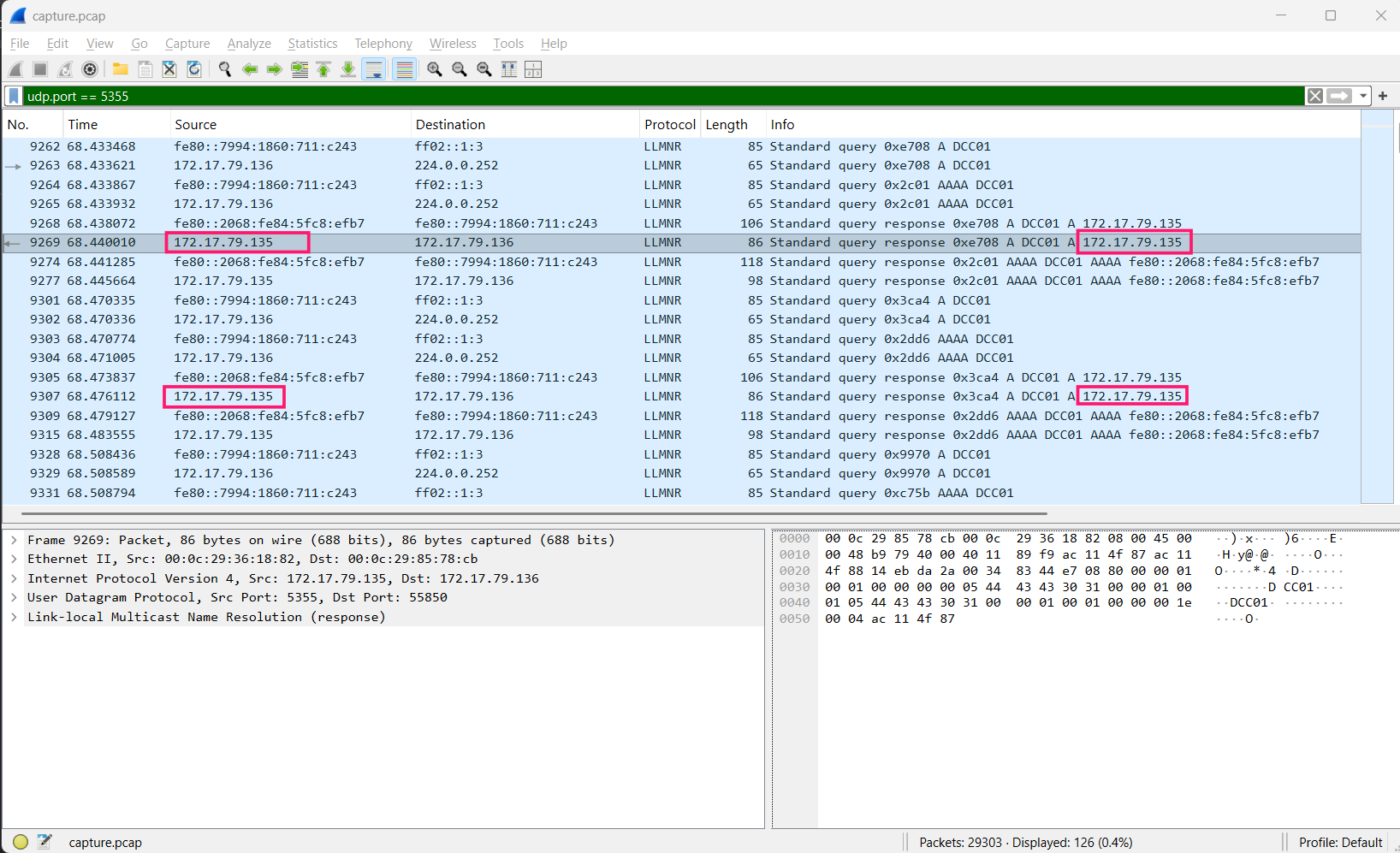
The victim, 172.17.79.136, asked for DCC01. No such host exists, but DC01 (the Domain Controller) does, so this looks like a typo. DNS could not resolve the name, Windows fell back to LLMNR, and 172.17.79.135 answered claiming to be DCC01. A legitimate machine has no reason to answer for a name that does not exist.
Answer
172.17.79.135
Task 2: The rogue machine’s hostname
What is the hostname of the rogue machine?
When a machine joins the network it asks for an address over DHCP, and its request usually includes its hostname. I filtered for DHCP traffic from the rogue address:
dhcp && ip.addr==172.17.79.135
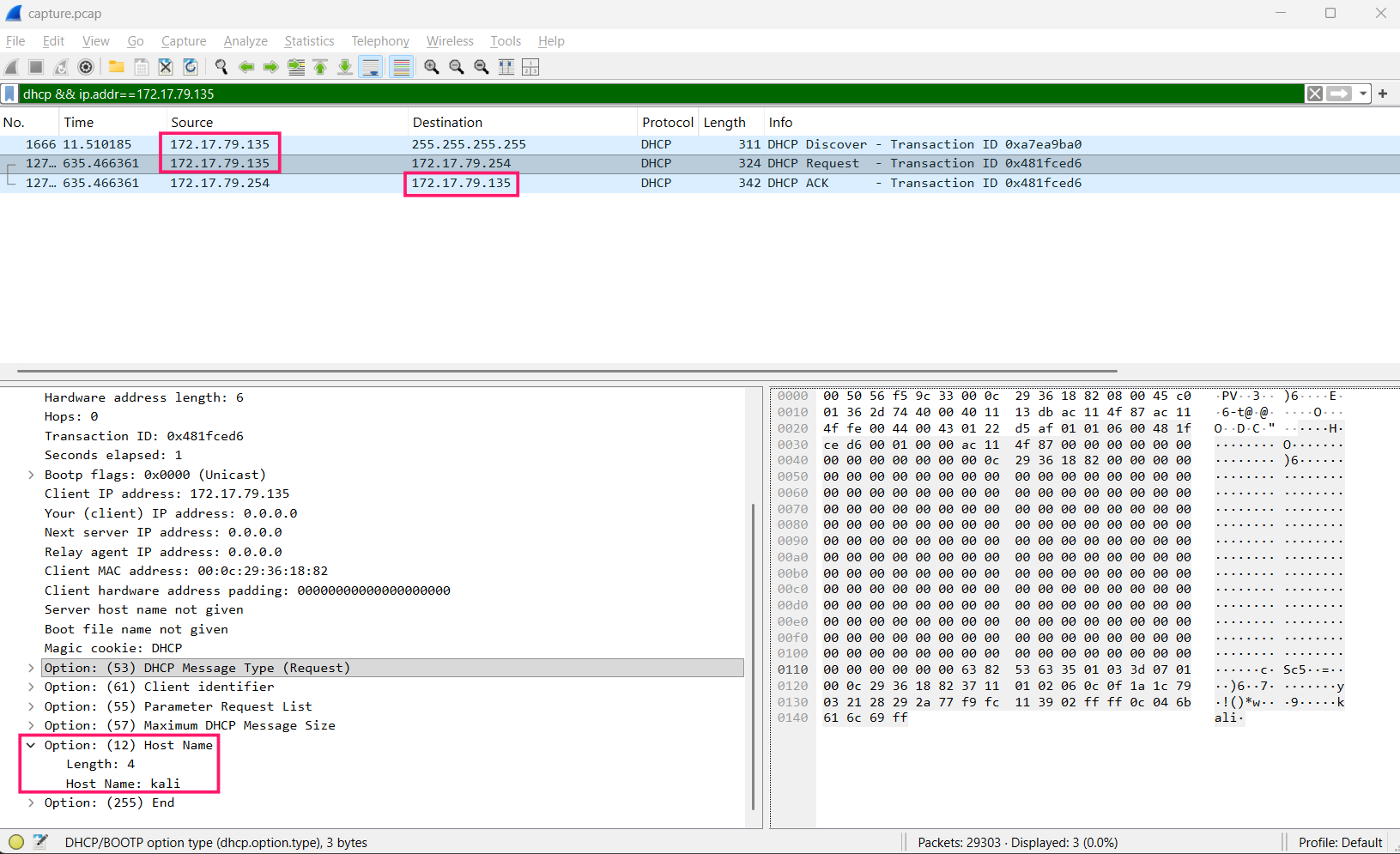
Only three packets matched, and the Host Name option in them gives the machine’s name: the default hostname of a Kali Linux install, which on its own is a strong sign this was an attacker’s box.
Answer
kali
Task 3: The user whose hash was captured
Now we need to confirm whether the attacker captured the user’s hash and it is crackable!! What is the username whose hash was captured?
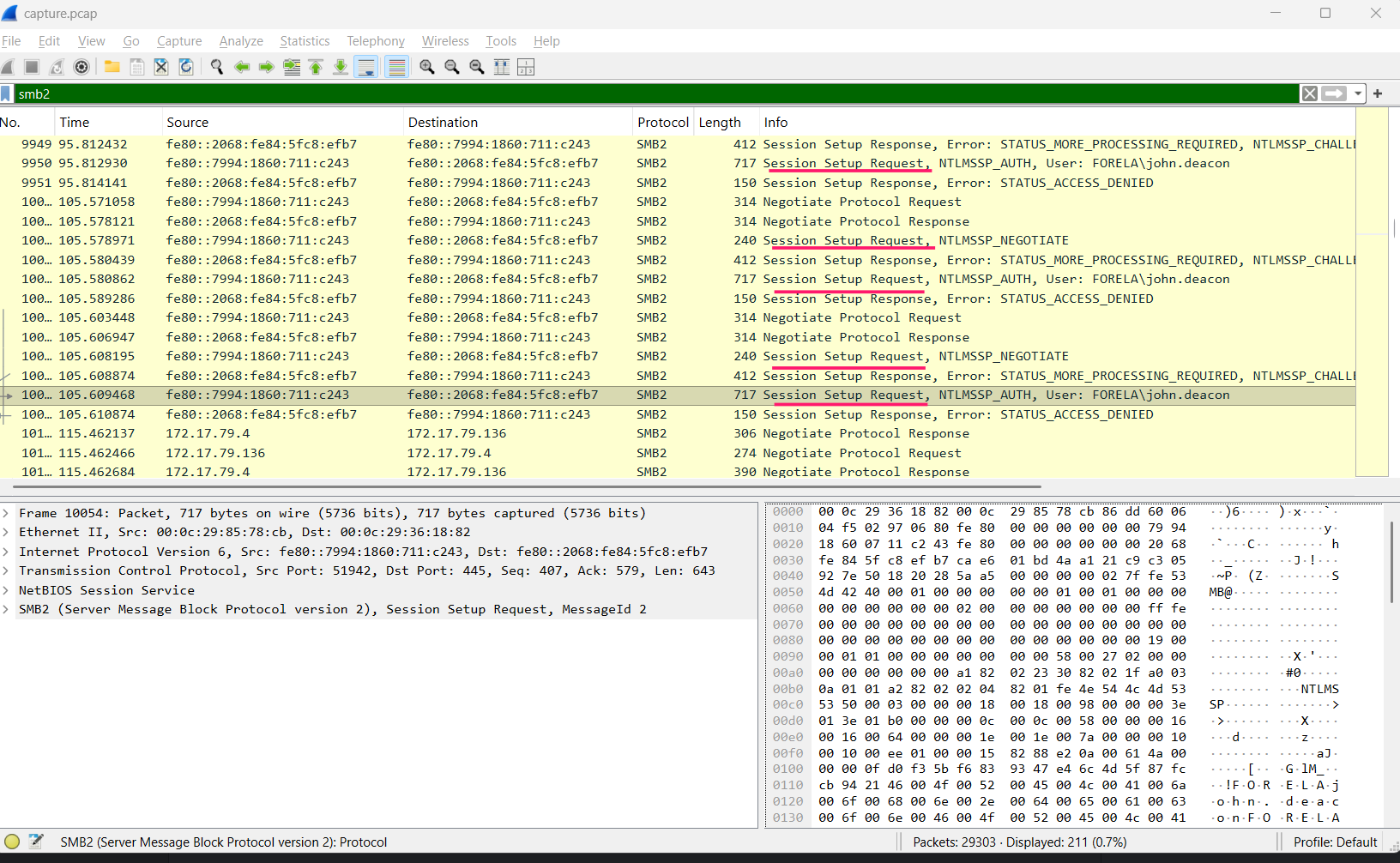
Once the victim believed 172.17.79.135 was DCC01, it tried to connect to it over SMB (the Windows file sharing protocol) and log in with NTLM, the older Windows authentication protocol that is still used when Kerberos is not available. I looked at the smb2 traffic and saw several NTLM authentication exchanges:
To see only the authentication messages, I filtered for ntlmssp:
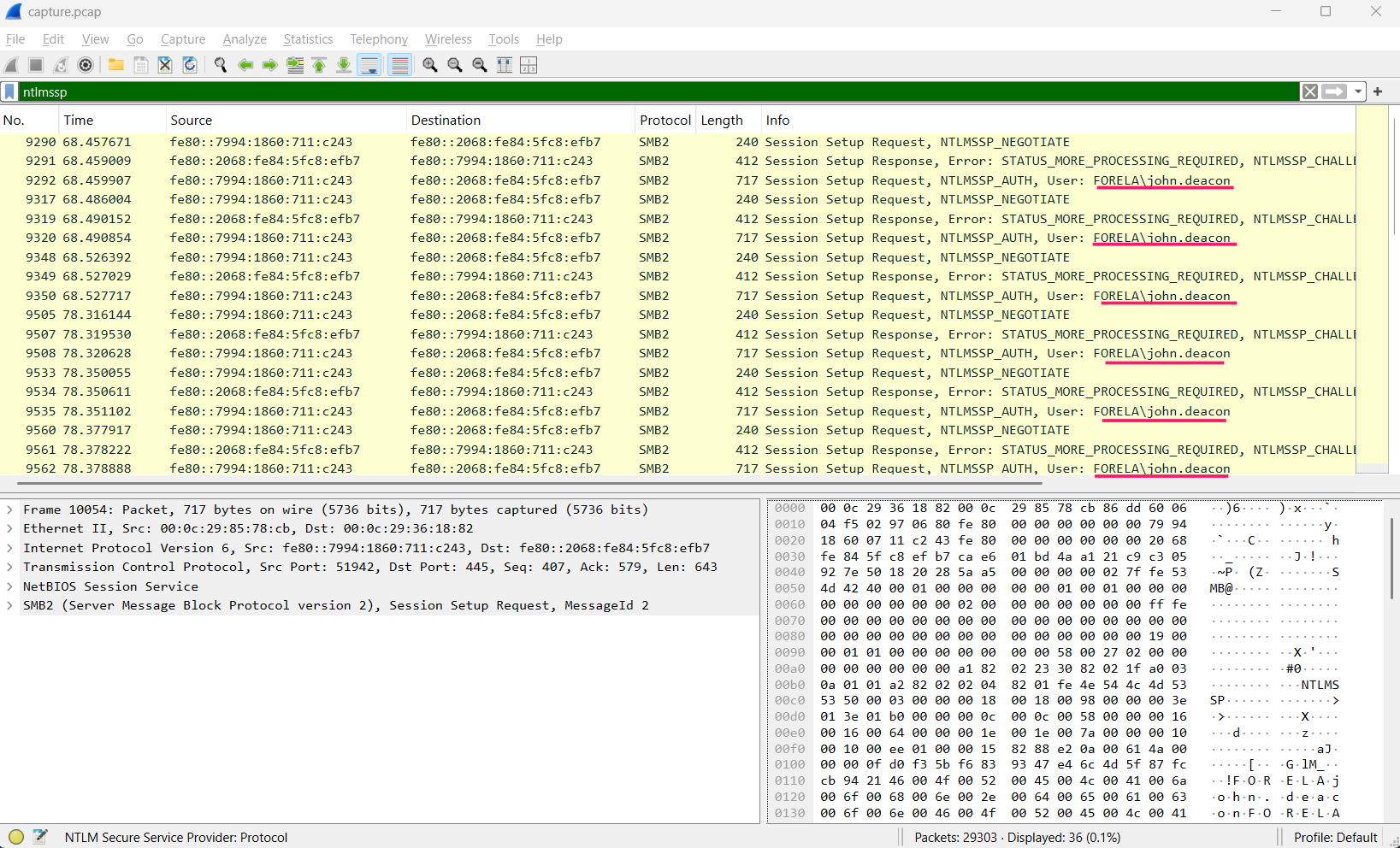
The NTLMSSP_AUTH packets carry the domain user FORELA\john.deacon. The authentication repeats several times within seconds, which is typical of Responder: it captures the hash and makes the client try again.
Answer
john.deacon
Task 4: When the hash was first captured
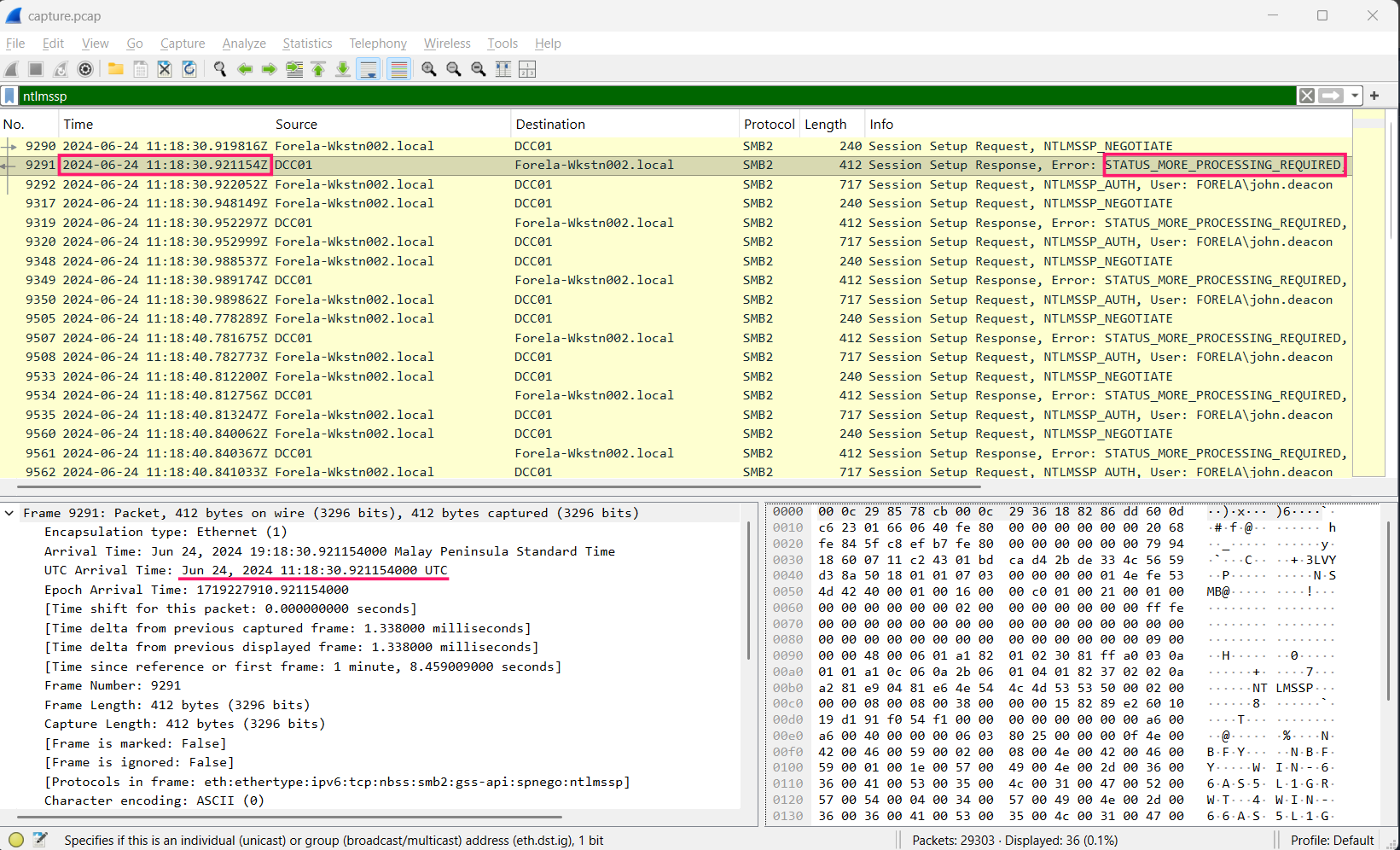
In NTLM traffic we can see that the victim credentials were relayed multiple times to the attacker’s machine. When were the hashes captured the first time?
With the same ntlmssp filter, I expanded the Frame details of the first authentication packet. Its UTC Arrival Time is when the hash first reached the attacker. Changing View > Time Display Format to UTC shows it in the packet list too.
Answer
2024-06-24 11:18:30
Task 5: The typo
What was the typo made by the victim when navigating to the file share that caused his credentials to be leaked?
As seen in Task 1, the victim typed DCC01 instead of DC01, which is what sent the name lookup to LLMNR in the first place.
Answer
DCC01
Task 6: The NTLM server challenge
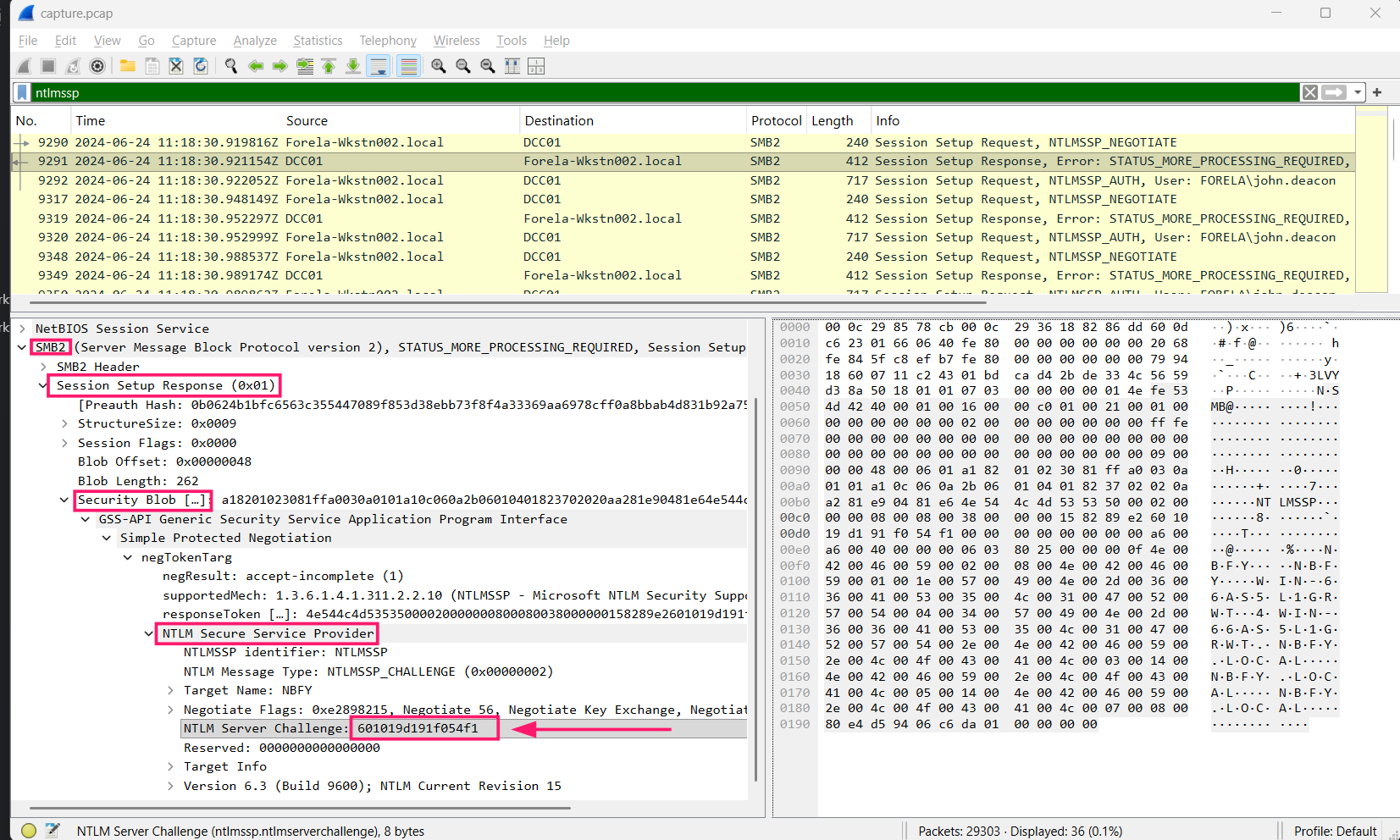
To get the actual credentials of the victim user we need to stitch together multiple values from the ntlm negotiation packets. What is the NTLM server challenge value?
NTLM is a challenge and response: the server sends a random challenge, and the client answers with a value computed from it and the user’s password hash. To crack the response, I needed the challenge as well. It is in the server’s NTLMSSP_CHALLENGE message, the packet marked Error: STATUS_MORE_PROCESSING_REQUIRED, under the NTLM Secure Service Provider details:
Answer
601019d191f054f1
Task 7: The NTProofStr
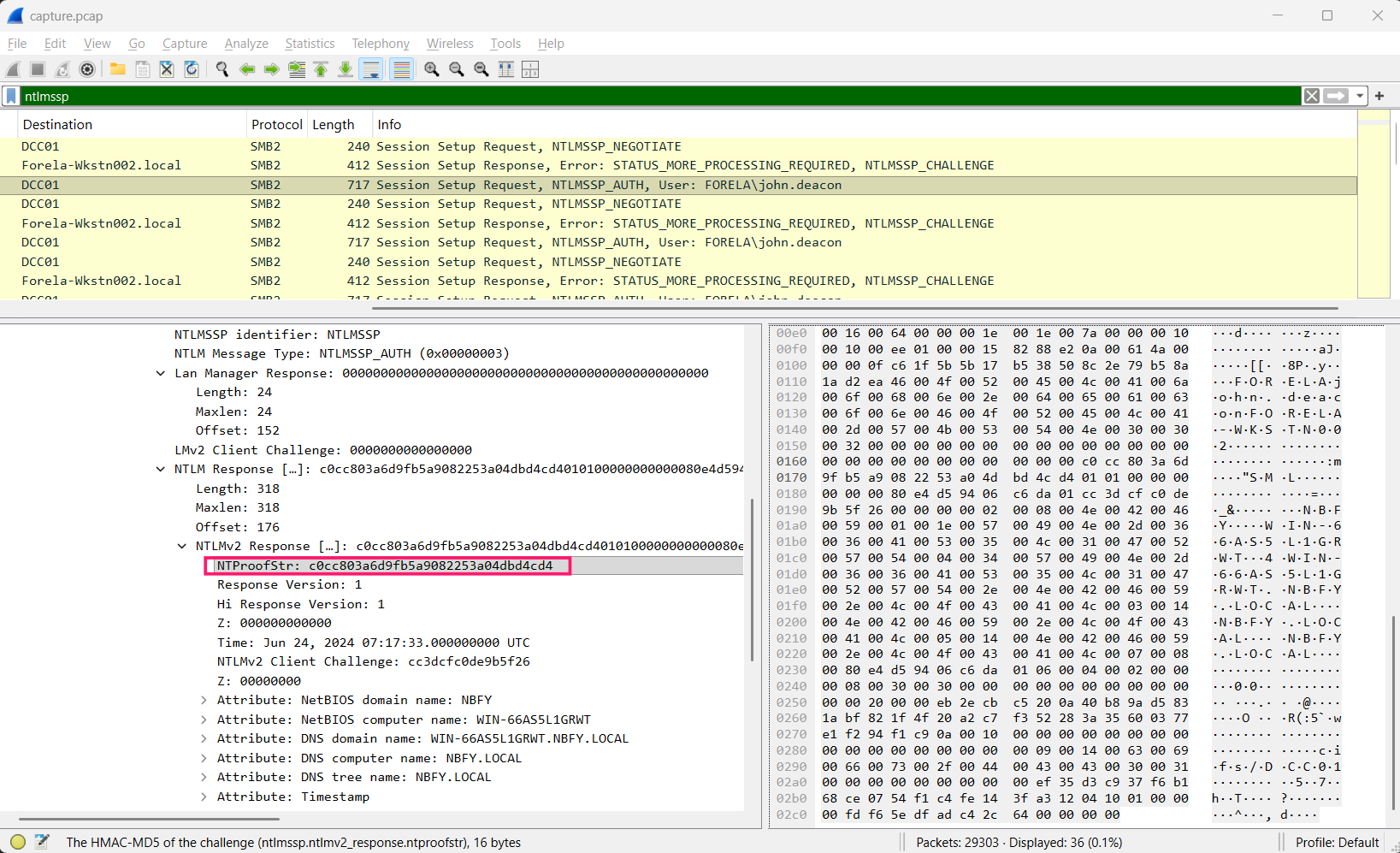
Now doing something similar find the NTProofStr value.
The client’s reply is in the NTLMSSP_AUTH, User: FORELA\john.deacon packet. Under the NTLM Secure Service Provider details, the NTLMv2 response starts with the NTProofStr:
Answer
c0cc803a6d9fb5a9082253a04dbd4cd4
Task 8: Cracking the password
To test the password complexity, try recovering the password from the information found from packet capture. This is a crucial step as this way we can find whether the attacker was able to crack this and how quickly.
Hashcat’s NTLMv2 format (mode 5600) is built from these values:
User::Domain:ServerChallenge:NTProofStr:NTLMv2Response(without its first 16 bytes)
The NTLMv2 response comes from the same NTLMSSP_AUTH packet, with its first 16 bytes (32 hex characters) removed, since those are the NTProofStr already in the line. Putting it together:
john.deacon::FORELA:601019d191f054f1:c0cc803a6d9fb5a9082253a04dbd4cd4:010100000000000080e4d59406c6da01cc3dcfc0de9b5f2600000000020008004e0042004600590001001e00570049004e002d00360036004100530035004c003100470052005700540004003400570049004e002d00360036004100530035004c00310047005200570054002e004e004200460059002e004c004f00430041004c00030014004e004200460059002e004c004f00430041004c00050014004e004200460059002e004c004f00430041004c000700080080e4d59406c6da0106000400020000000800300030000000000000000000000000200000eb2ecbc5200a40b89ad5831abf821f4f20a2c7f352283a35600377e1f294f1c90a001000000000000000000000000000000000000900140063006900660073002f00440043004300300031000000000000000000
I saved this to ntlm.txt and ran it against rockyou.txt:
┌──(kali㉿DESKTOP-R1DTBOS)-[~]
└─$ hashcat -m 5600 ntlm.txt /usr/share/wordlists/rockyou.txt
hashcat (v7.1.2) starting

<- - - SNIP - - ->

Started: Tue Sep 15 19:49:14 2026
Stopped: Tue Sep 15 19:49:14 2026

┌──(kali㉿DESKTOP-R1DTBOS)-[~]
└─$ hashcat -m 5600 ntlm.txt /usr/share/wordlists/rockyou.txt --show
JOHN.DEACON::FORELA:601019d191f054f1:c0cc803a6d9fb5a9082253a04dbd4cd4:0101000000000000...0000000000:NotMyPassword0k?
The password was in rockyou.txt and cracked within the same second, so the attacker would have had it almost immediately.
Answer
NotMyPassword0k?
Task 9: The share the victim wanted
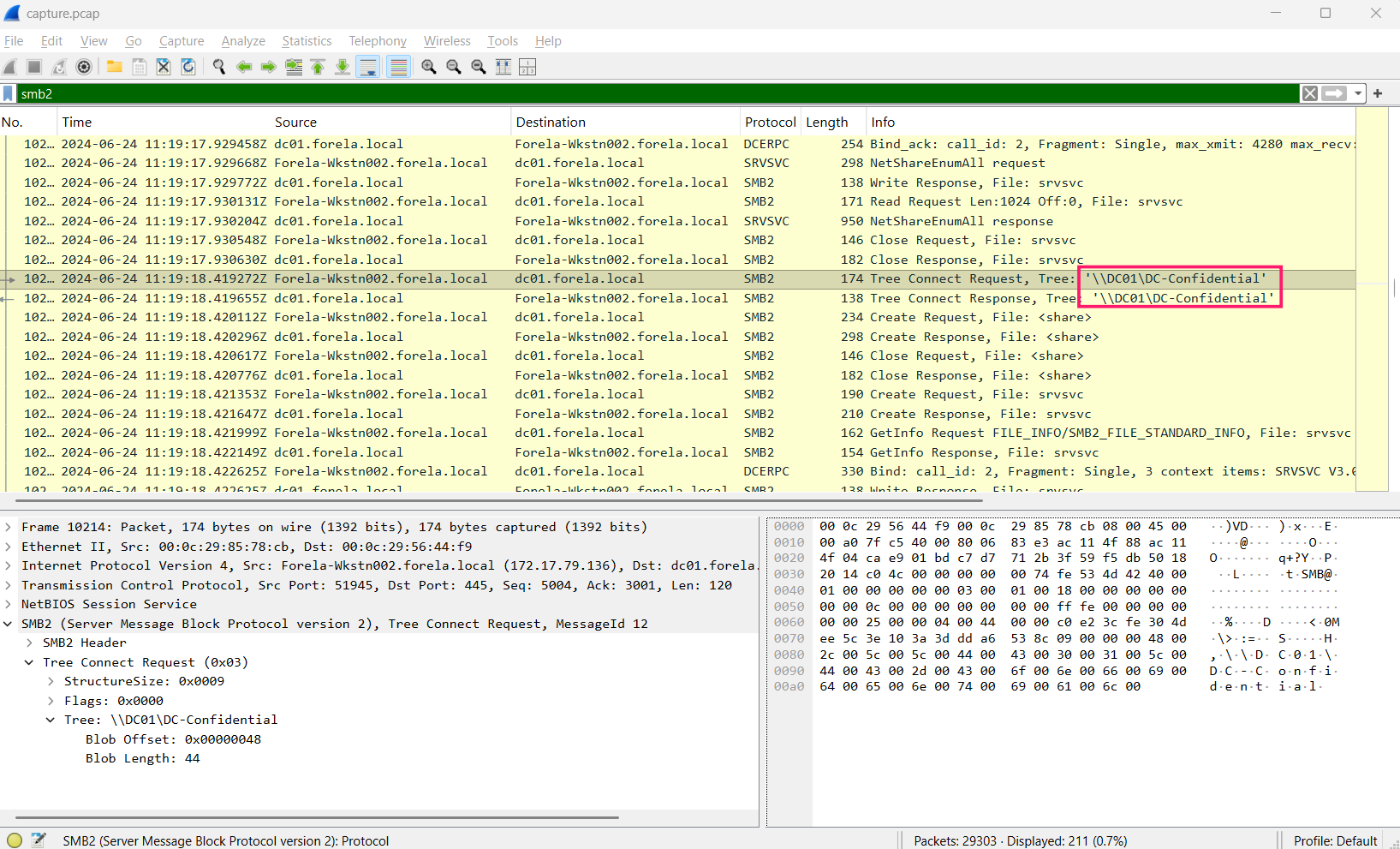
Just to get more context surrounding the incident, what is the actual file share that the victim was trying to navigate to?
Filtering for smb2 and reading through the tree connect requests shows the share the victim was after:
Answer
\\DC01\DC-Confidential
Timeline
| Time (UTC) | Event |
|---|---|
| 2024-06-24 | 172.17.79.136 looks up the mistyped DCC01, and kali (172.17.79.135) answers the LLMNR query |
| 2024-06-24 11:18:30 | The victim authenticates to the rogue machine and john.deacon’s NTLMv2 hash is captured |
| Offline | The hash cracks instantly with rockyou.txt to NotMyPassword0k? |
Similar
- HTB Sherlocks - Reaper: the same LLMNR trick, but the captured hash is relayed instead of cracked
- HTB Sherlocks - Campfire-2: another attack that ends with a hash cracked offline